

- Login
- Search

- Contact Us

-
Have a question? Our team is here to help guide you on your automation journey.
-
Explore support plans designed to match your business requirements.
-
How can we help you?
-


English
Close
- Resources
Featured
 Named a 2026 Gartner® Magic Quadrant™ Leader for RPA.Recognized as a Leader for the Eighth Year in a Row Download report Download report
Why RPA ROI matters
RPA done correctly delivers ROI, high ROI. According to Automation Anywhere's most recent Now & Next report, the average ROI achieved by businesses is 250%, typically paid back within six to nine months after deployment. Top performers, those companies that followed industry best practices, received an average of 380% ROI on their RPA investments.
Those numbers speak to the business value of robotic process automation (RPA), but they're averages. Your project's return on investment (ROI) depends on the processes you select, the costs you incur, and the benefits you actually capture and report. This article shows you how to build defensible numbers for both sides of the equation.
The RPA ROI formula
The formula is simple. Applying it accurately to RPA is where most teams stumble, because "total benefits" combines hard financial returns (good) with intangible, indirect returns (difficult to capture precisely). The rest of this guide breaks down how to get both right.
RPA ROI (%) = [(Total Benefits − Total Cost of Ownership) / Total Cost of Ownership] × 100
Payback Period (months) = Total Implementation Cost / Average Monthly Savings
How to calculate ROI for an RPA project in 4 steps
- Set a measurement baseline for the process you're automating (volume, handle time, error rate, FTEs).
- Calculate total cost of ownership (TCO), licensing, infrastructure, development, and maintenance.
- Calculate total benefits, hard savings plus quantified proxies for soft benefits.
- Apply the ROI formula above.
- Calculate payback period to set executive expectations.
- Re-measure after deployment and refine your inputs as the program matures.
Step 1: Set a baseline before you begin
It is essential to determine upfront what you want to measure. To measure efficiency, capture how many FTEs it takes to finish a targeted task or process as a "before" snapshot, then measure again after the bots are deployed. Or capture a "before" picture of how many invoices your accounts receivable team can process in a week, then the "after" picture to derive your productivity gain.
Use whatever metrics make sense for your business, but capture them before implementation. Without a baseline, every ROI number you produce later will be contested.
Step 2: Measure the cost of RPA (TCO)
Total cost of ownership for RPA consists of four basic, quantifiable components:
- Cost of the RPA solution — licensing, subscription, and platform fees.
- Cost of supporting infrastructure — hardware, software, and networking required to run the bots.
- Cost of development — developer, business analyst, and SME time to analyze, redesign, and automate the process, plus any tooling.
- Cost of ongoing maintenance — the fully loaded cost of personnel needed to monitor, update, and govern the bots.
This takes attention to detail, but it can be done precisely.
Step 3: Measure the return (benefits)
Measuring return is harder because of the intangible benefits RPA delivers.
Take a hard financial return: by automating a business process, you save the equivalent of one full-time employee's (FTE's) time for a year. You calculate the dollar value by finding the fully loaded annual cost of an FTE, including benefits, taxes, retirement plans, and overhead for, say, $80,000. That's a clean number you can defend.
Now take an intangible return: your employees are happier because they have offloaded drudge work and are free to do higher-value work. How do you measure happiness? How do you assess the value of activities that are more strategic to the business? How do you measure the benefit of a better decision being made?
You can't get a precise reading on every soft benefit, but you can identify KPIs and use them as proxies.
The most popular RPA benefits to track
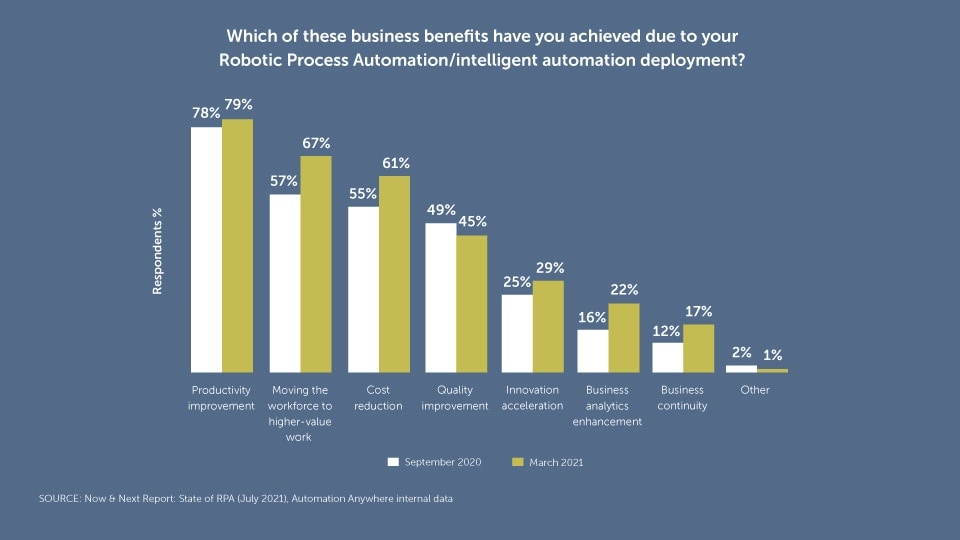
In Automation Anywhere's Now & Next report, productivity improvement was the No. 1 reported benefit, followed by moving employees to higher-value work. Cost reduction came in third, followed by quality improvements. The benefits to track:
- Productivity — can workers achieve more in the same amount of time?
- Quality — are there fewer errors?
- Efficiency — can tasks be completed faster or eliminated entirely?
- Employee satisfaction — are employees happier?
- Customer experience — are customers getting a better experience?
- Business agility — can the company adjust to market changes more quickly?
- Business continuity — can the business keep operating through disruption?
Step 4: Find suitable proxies for intangible benefits
For business agility, a good proxy might be the number of new apps your development team ships in a month, or the number of new customers acquired and the revenue they bring, or the financial value of new partnerships signed.
For customer experience, use churn as a proxy and lower churn equals quantifiable benefit. For quality, sum the number of errors and what it costs to fix them in people-time and infrastructure cost. You can even build a proxy for reputational improvement in the marketplace as the result of producing higher-quality goods or services.
The point isn't precision, it's defensibility. A reasonable proxy, measured consistently before and after, beats a perfect metric you can't actually capture.
A worked example: invoice processing
Let's run the numbers on automating an invoice-processing workflow.
Inputs
- 3 full-time AP clerks process invoices today
- Fully loaded cost per clerk: $65,000/year
- Annual labor cost on the process today: 3 × $65,000 = $195,000
- RPA implementation (development + setup): $60,000 one-time
- Annual RPA license + maintenance: $25,000
After automation
- 1 FTE retained for exception handling, supplier queries, and oversight
- 2 FTEs redeployed to higher-value work
- Hard labor savings captured: 2 × $65,000 = $130,000/year
Year 1 TCO
$60,000 + $25,000 = $85,000
Year 1 ROI
[($130,000 − $85,000) / $85,000] × 100 = 53% in Year 1
Year 2+ ROI (no re-implementation)
[($130,000 − $25,000) / $25,000] × 100 = 420% in Year 2
Payback period
$85,000 / ($130,000 ÷ 12) ≈ 7.8 months
This is a deliberately conservative example — it counts only hard labor savings and ignores error reduction, faster cycle times, and the strategic value of the redeployed team. Most well-scoped RPA projects will look stronger than this once those benefits are layered in.
RPA ROI benchmarks
For context against your own numbers:
Metric | Industry benchmark |
|---|---|
Average enterprise RPA ROI | ~250% |
Top-performer ROI | ~380% |
Typical payback period | 6–9 months |
Operational cost reduction (in-scope processes) | 30–50% |
Source: Automation Anywhere Now & Next report. These are industry-wide ranges, your number depends heavily on process selection. High-volume, rules-based work delivers stronger ROI than low-volume or exception-heavy processes.
Common mistakes that distort RPA ROI
- Skipping the baseline. Without a "before" snapshot, every "after" number is contested.
- Counting only license costs. Implementation, infrastructure, change management, and ongoing maintenance are typically 2–4× the license fee in Year 1.
- Double-counting FTE savings. If clerks are redeployed rather than eliminated, count redeployed value separately from headcount savings.
- Ignoring soft benefits entirely. Productivity and quality gains often exceed pure labor savings on mature programs.
- Measuring once. ROI should be re-measured quarterly as bot scope and process maturity evolve.
Why calculating ROI is worth the effort
You'll almost certainly find that implementing RPA delivers significant benefits to your employees, customers, and business. You probably assumed that. But it's nice to have confirmation in solid numbers.
To evangelize RPA internally, you need sound statistics and proof. You also need to know what's working and what's not. Whether you're pleasantly surprised or disappointed by the ROI numbers you calculate, you'll have valuable information you can use to improve the program. And that's good for everyone involved.
RPA ROI calculator FAQs
How do you calculate ROI for an RPA project?
Calculate RPA ROI by subtracting total cost of ownership (TCO) from total benefits, dividing the result by TCO, and multiplying by 100. TCO includes licensing, infrastructure, development, and maintenance. Benefits include hard labor savings, error reduction, and quantified proxies for soft benefits like employee satisfaction and agility.
What is the formula for RPA ROI?
The RPA ROI formula is: ROI (%) = [(Total Benefits − Total Cost of Ownership) / Total Cost of Ownership] × 100. To estimate payback time, divide total implementation cost by average monthly savings.
What is a good ROI for RPA?
A good RPA ROI typically ranges from 100% to 250% in the first 12–18 months, with top-performing implementations reaching 380% or higher. The Automation Anywhere Now & Next report puts the enterprise average at 250%, with payback in six to nine months.
What is the average payback period for RPA?
The typical payback period for an RPA project is 6 to 9 months. Well-scoped, high-volume processes can pay back in as little as 3 to 4 months. Payback depends on implementation cost, license fees, and the volume and complexity of automated work.
Can I calculate RPA ROI in Excel?
Yes. An Excel RPA ROI calculator needs the following inputs: FTE count, task volume per period, average handle time, fully loaded hourly cost, implementation cost, and annual license cost. The spreadsheet then computes annual savings, payback period, and multi-year ROI. Download our free template above.
How do you measure intangible RPA benefits?
Use KPI proxies. For agility, track new products shipped or partnerships signed. For customer experience, track churn rate. For quality, track error counts and rework cost. For employee satisfaction, use engagement-survey scores. The goal is consistent before-and-after measurement, not perfect precision.
Learn How Top Performers Achieve High ROI.
Stay up to date:
 Subscribe to the blog

Try


For Students & Developers
Start automating instantly with FREE access to full-featured automation with Cloud Community Edition.
