

- Login
- Search

- Contact Us

-
Have a question? Our team is here to help guide you on your automation journey.
-
Explore support plans designed to match your business requirements.
-
How can we help you?
-


English
Close
- Resources
Featured
 Named a 2026 Gartner® Magic Quadrant™ Leader for RPA.Recognized as a Leader for the Eighth Year in a Row Download report Download report
Databricks package
Run SQL queries on your Databricks data and process large datasets with ease.
Scalable approach
Retrieve query results efficiently, even for high-volume data.
Execution control
Access job results, stop long-running queries, and manage jobs in your Databricks workspace.
File management
Upload and download files from your Databricks to your local environment.
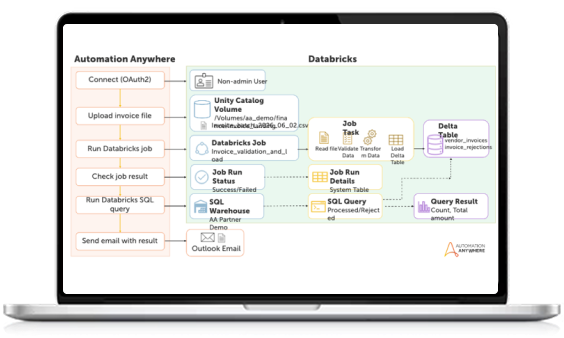
Scale invoice management
Upload invoice files to a Databricks Unity Catalog volume, trigger the validation job, monitor execution status, and query the resulting Delta tables – then deliver the reconciliation report directly to Finance Operations.
- Automated upload and job trigger
- Real-time job monitoring
- Smart SQL querying
- Automated business notifications
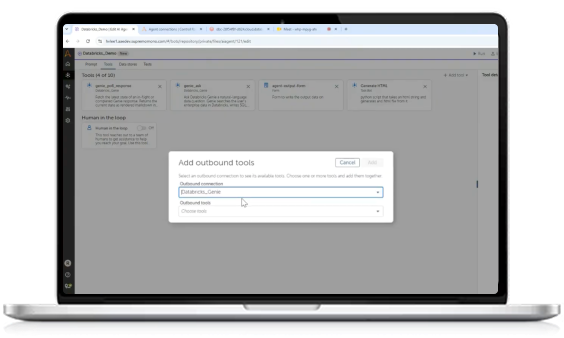
AI agents that query, reason, and act on live data
Goal-based agents invoke Databricks SQL, catalog and job tools at runtime – with OAuth authentication and role-based controls built in, not bolted on.
- OAuth-secured connections
- Selective tool exposure
- Role-based access control
- Live data, not stale snapshots
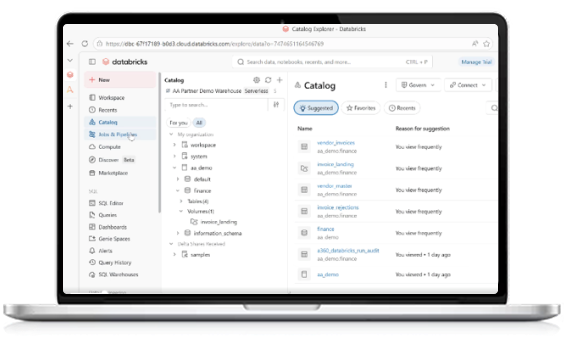
Your Databricks models. Every automation.
Register a Databricks Model Serving endpoint once – and every agent in your workspace can use it as a cognitive backend, from no-code task agents to programmatic code agents.
- One connection, any agent type
- Inference inside your perimeter
- Centralized credential management
- Full cognitive coverage
Connected via MCP, not custom code
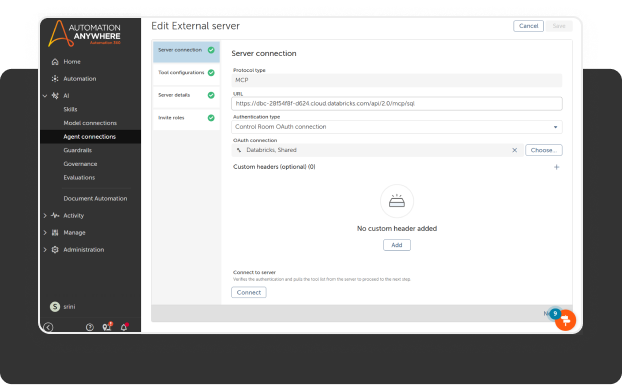
Automation Anywhere connects to Databricks through the Model Context Protocol (MCP). Your AI agents discover and invoke Databricks tools at runtime, with no hardcoded API wiring. Add a new Databricks tool to your MCP server, and every agent in your workspace can use it immediately.
- No custom connectors to maintain
- Tool exposure controlled by your team
- Compatible with any MCP-compliant Databricks server
Automation Anywhere and Databricks in action
See how Finance Operations teams can implement scalable invoice ingestion and reconciliation with agentic automation connected to live data.
Databricks package prerequisites
Provision these Unity Catalog (UC) and Databricks platform objects to support each category of Automation Anywhere Databricks package actions.
- Authentication
- Data governance
- SQL actions
- File actions
- Job actions
- Connection actions
Authentication
- Databricks Service Principal (preferred)
- OAuth Machine-to-Machine (M2M) authentication
- Workspace assignment for the service principal

Data governance
- UC enabled workspace
- At least one Catalog and Schema
- Privilege grants:
- USE CATALOG
- USE SCHEMA
- SELECT
- MODIFY (if applicable)

SQL actions
- SQL Warehouse enabled for UC
- Warehouse permission: Can Use. For more details, see Execute SQL statement prerequisites
- Catalog, Schema, Table or view, SQL warehouse

File actions
- Unity Catalog Volumes OR External locations
- Volume or External location, Storage credential
- Storage Credentials configured
- Grants:
- READ FILES
- WRITE FILES
- For more details, see Delete file action prerequisites.

Job actions
- Jobs configured to run with User identity or Service principal identity
- Access to all UC-governed assets used by workflows and SQL queries
- Job, Compute, Catalogs/Schemas/Tables used by job
- Job-level CAN RUN or equivalent permission

Connection actions
- Service principal, OAuth app, UC-enabled workspace

Frequently asked questions
What automation use cases does the Automation Anywhere and Databricks integration support?
The integration supports end-to-end data workflow automation: triggering Databricks jobs and pipelines from business events, automating ETL and data ingestion across enterprise systems, acting on ML model outputs to drive downstream business processes, monitoring data quality with automated exception handling, and orchestrating multi-system workflows that span Databricks, ERP, CRM, and ITSM platforms.
How does Automation Anywhere handle security and data governance when connecting to Databricks?
Connections use OAuth 2.0 token-based authentication. Automation Anywhere respects Databricks Unity Catalog permissions, so agents only access data the authenticated user is authorized to see. All automation actions generate audit trails. No data is stored outside the secure pipeline, and enterprise-grade encryption applies in transit and at rest.
Can Automation Anywhere AI agents trigger and interact with Databricks notebooks and jobs?
Yes. Through the MCP connection, Automation Anywhere AI agents can discover available Databricks tools, trigger notebook runs and job workflows, pass parameters, monitor execution status, and branch logic based on results, all within a single automated process without manual handoffs.
Can Automation Anywhere automate data pipelines and ETL processes in Databricks?
Yes. Automation Anywhere can initiate Delta Live Tables pipelines and Databricks Workflows, handle failures with automated retries or escalations, extract data from upstream SaaS systems, and load processed results into destination platforms. Complex multi-step ETL orchestration across Databricks and other enterprise systems runs as a single end-to-end automated workflow.
What is the Databricks MCP server and how does Automation Anywhere connect to it?
Databricks exposes its platform capabilities (notebooks, jobs, SQL warehouses, catalog) as tools via the Model Context Protocol (MCP). Automation Anywhere connects to the Databricks MCP server through our Agent Registry that enables secure, role based connections with third party MCP Servers. Once connected, Automation Anywhere AI agents can dynamically discover and invoke Databricks tools as steps in automated business workflows, no custom integration code required.
Ready to get started?
There is nothing to install. The Databricks connector ships with the AAI platform. Learn more in the product documentation.

Try


For Students & Developers
Start automating instantly with FREE access to full-featured automation with Cloud Community Edition.
